

Appearance
Login Screen
Video: Creating Your Account
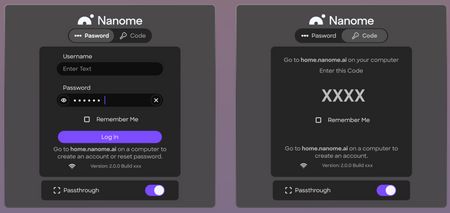
Upon launching the Nanome app, you will be brought to the login screen. There are options for entering your Nanome account username and password, or using an authentication code to log in. New users can create an account directly from this screen by clicking the Create Account button.
On the left side of the login screen, a basic tutorial banner is displayed to help new users get started. This banner can be closed, and toggled back on through the Settings menu once logged in.
You can also see your current network connection status (online or offline) and the Nanome version number.
Below the login screen, there is a toggle for enabling passthrough (default set to "on").