

Appearance
Enterprise Deployment Information - Nanome 1.x ONLY
This section provides additional information and resources for on-prem enterprise deployments. For assistance with setting up or managing your environments, please reach out to your dedicated Nanome representative.
NOTE: THIS IS FOR NANOME 1.X ONLY. Please contact your enterprise account manager for MARA or NanomeAI deployment information.
Recommended Infrastructure
The following diagram illustrates how network traffic in Nanome works, as well as what we recommend for your enterprise network infrastructure.
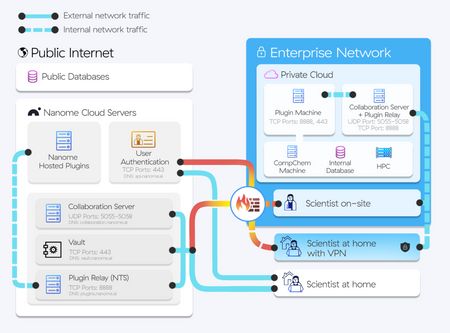
IT & Networking Requirements
Virtual Machine #1:
The recommended specs for the Private Server VM are:
- Amazon AWS T2.Medium EC2 Windows 2012 Server or greater or equivalent
- 1 quad core CPU (e.g., Intel Xeon 3440, E3-1230 etc.) 4 GB RAM 1 GBps NIC / uplink port speed
- Windows Server 2012 and above
- 10GB + of storage space
Virtual Machine #2:
The recommended specs for the Dedicated Plugins VM are:
- Amazon AWS T2.Large EC2 Linux machine with 30 GB of disk storage or equivalent
- 1 GBps NIC / uplink port speed
- A Linux based operating system (Ubuntu or CentOS)
- 4 CPU - equiv. to an Intel Broadwell E5-2686v4 or higher
- 8GB of RAM
- 90GB of Storage space
- 1 GBps NIC /uplink port speed
Inbound Ports
The following inbound ports are required for VM #1 to connect to the VR devices:
- UDP 5055, 5056
- TCP 443, 80, 8888
The following inbound ports are required for VM #2 to allow connection to plugin webpages (like Vault and Data Table):
- TCP 80, 443
Outbound Ports
The following outbound ports are needed on each of the VR devices for internal collaboration:
- UDP Ports: 5055, 5056 towards VM #1
- TCP Ports 8888 towards the VM #1
- TCP Ports 80 & 443 towards VM #2
- TCP Port 443 open for ”api.nanome.ai”
- TCP Port 443 open for “home.nanome.ai”
- TCP Port 443 open for “cms.nanome.ai”
Nanome Collaboration for training sessions
The following outbound ports are needed on each of the VR devices for external training sessions with Nanome:
- UDP 5055, 5056 towards the DNS “collaboration.nanome.ai”
- TCP 8888 towards DNS “plugins.nanome.ai”
Plugin Deployment Procedure & Security Info
Steps for Deployment
(See our README doc for more details.)
- Step 1: Provision the Dedicated Plugins Virtual Machine.
- Step 2: SSH into the VM + Install Git & Docker.
- Step 3: Pull the Nanome Plugin Deployer and run it.
- Step 4: Docker Container Health Check.
- Step 5: Validate the connection from the VR client.
Plugins that Require DNS Entries
The Data Table, Vault, and Quickdrop plugins will be hosted differently than other plugins and will exist as DNS entries under your domain.
NTS_IP=<NTS_IP>

./deploy.sh -a $NTS_IP \
  --plugin data-table --nginx --url nanome-table.example.com \
  --plugin vault --nginx --url nanome-vault.example.com \
  --service quickdrop --nginx --url nanome-quickdrop.example.com
HTTPS for Web Plugins and Services:
By default, self-signed certs in the nginx/certs folder are used, but if you'd like to provide your own certs, simply replace default.crt and default.key with your own certs.